Find investors for your round
Search venture capital and private equity funds built from SEC Form D filings, filter by fund type, fund size, name keyword and state, and see the people each filing names.
The Investors lens helps founders find the funds most likely to back their round, and the people who run them. Every fund links back to a real SEC filing, so you can check that it raised recently before you spend time on it.
Where investor data comes from
When a US fund raises money from its own investors, it files a Form D with the SEC. OmniLead treats an issuer as an investor only when its Form D says it is one: Item 4, the industry group, is Pooled Investment Fund. The filing is public and lists:
- The fund's legal name and business address
- The fund type: venture capital, private equity, hedge fund or other investment fund
- Related persons: the executive officers, directors and promoters of the fund or its manager, with their role
- The total offering amount, which for a fund is the size of the fund being raised, or "Indefinite"
- How much has been sold, how many investors have already invested, and the date of each filing and amendment
OmniLead reads these filings from SEC EDGAR and builds one profile per fund, plus a person record for each related person, linked to the fund by name. Every value keeps its source, so you can click through to the filing on sec.gov. Contact details never come from the filing: OmniLead finds them on the fund's own website and shows that page as the source.
What Form D doesn't say
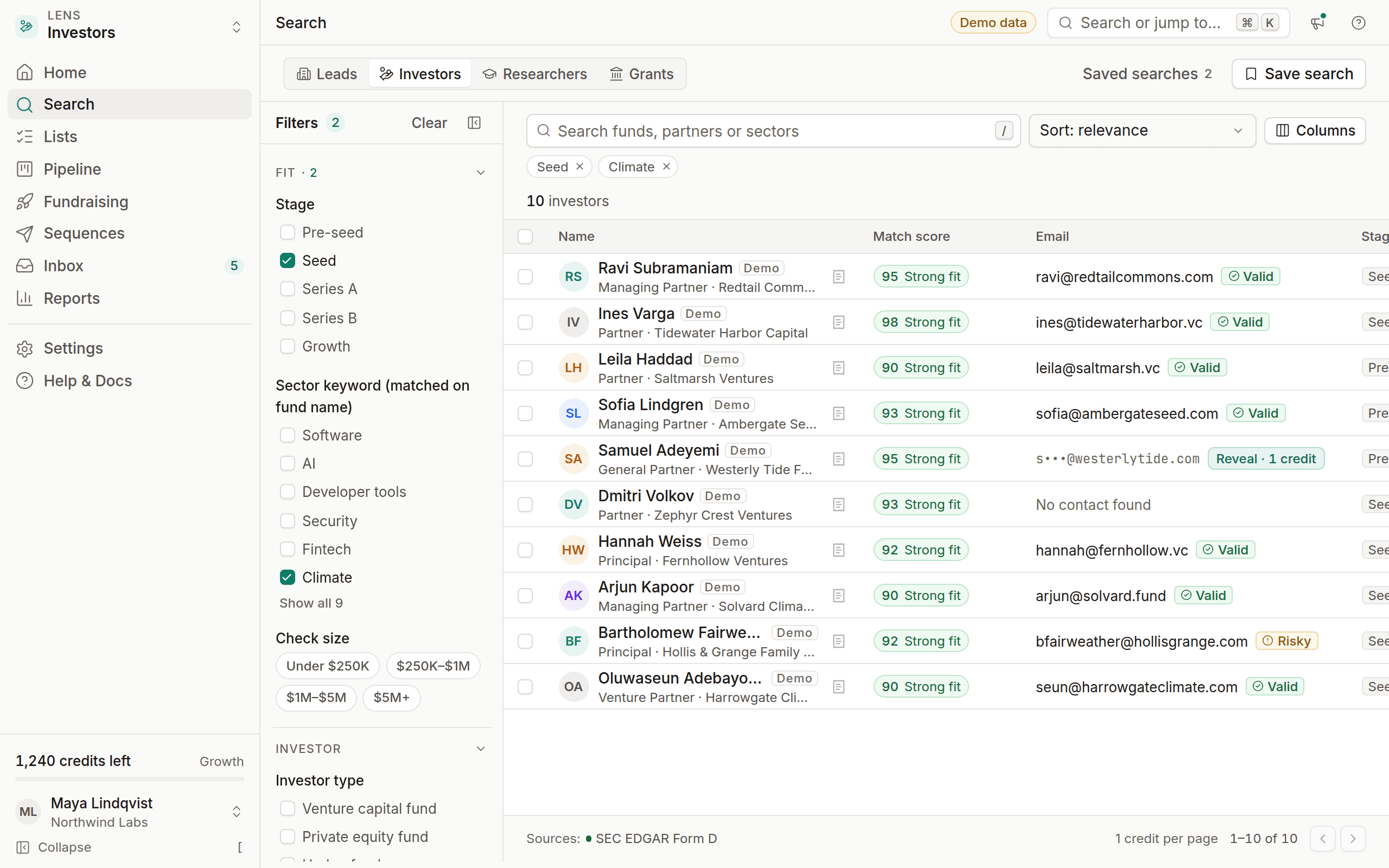
- Sector focus. A fund's filing says it's a venture capital fund, not what it invests in. The Sector keyword filter matches words in the fund's name, such as "Climate", "Bio", "Health" or "AI", and says so. A fund called "Northwind Ventures II" won't match any sector, even if it only backs climate companies.
- Stage. There's no stage field. Use fund type and fund size instead.
- Fund size, sometimes. Many funds write "Indefinite" instead of an amount. Those funds have no fund size and don't match a Fund size band.
- Check size. The filing gives the fund's size and the minimum an investor in the fund must put in, not the size of the fund's own checks.
Search for investors
Switch to Investors
Pick Investors in the lens switcher, or press ⌘ 2.
Set the fund type and state
Use Investor type to keep venture capital funds, and State for where the fund is based.
Add a sector keyword and recent activity
Add a Sector keyword if you want funds that name a sector, and Last Form D filing to focus on funds raising now.
Filters
Each fund's profile shows its fund size, the total offering amount in its latest Form D.
Reading an investor profile
Click a fund to open its profile in the drawer:
- Filings: the latest Form D or amendment with its date, linked to sec.gov
- Fund details: fund type, fund size, amount sold and the number of investors so far, each from the filing
- People: the related persons from the filing with their role, for example "Managing Member of the General Partner". When the filing names a company instead of a person, such as the general partner, it's shown on the fund, not as a person.
- Match score (Growth and Agency, when you have an opportunity profile): a 0–100 score with the weighted breakdown behind it, so you can see exactly why a fund fits
Reveal a person's contact with Reveal · 1 credit. Emails come from the fund's own website, or from the pattern of addresses published there, and are verified before you see them. If none can be found, you aren't charged.
Free tools built on the same data
- The investor lookup lists funds that filed a Form D in the last 12 months with a sector keyword in their name, filtered by state and fund size. It shows each fund's type, size and latest filing, and never lists a company raising money.
- The investors by state pages answer two separate questions from Form D. First, investor activity: how many new offerings companies in a sector and state filed in the last 12 months, how many investors those filings say have already invested, and how much was sold. Second, which venture capital and private equity funds based in that state filed recently. When there are too many offerings to read every filing, the page says how many it read.
From search to outreach
Shortlist
Select the funds that fit and choose Add to list, for example "Seed – round 1".
Pick the right person
Open each fund and reveal the person whose role fits, usually a managing member or partner of the general partner. One well-chosen partner beats three cold ones.
Track in a fundraising pipeline
Add them to a pipeline built from the fundraising template, with stages from Researching to Committed.
Send a short, specific sequence
Enroll them in a fundraising sequence. Mention their portfolio or thesis in the first line, using a custom field if you've recorded it.
What investor data won't include
- Who invested in a company. Form D reports how many investors put money in, never who they are.
- A sector focus the filing doesn't state. Sector is a keyword match on the fund's name, labeled as such.
- Individual angels without public filings or pages. OmniLead only lists people with a public, professional footprint.
- Personal contact details. Emails come from professional sources. Addresses of related persons in a filing are never stored or shown.
- Portfolio claims we can't source. If a fund's website doesn't publish its portfolio, OmniLead doesn't infer one.