What is OmniLead?
OmniLead finds investors, customers, researchers and grants from public sources, verifies every contact and runs compliant outreach from one workspace.
OmniLead is one tool for finding the people who fund, buy from and partner with you, checking that their contact details are real, and reaching them without putting your domain or your company at risk.
Most teams stitch this together from four products: a contact database, an email verifier, a CRM and a cold-email sender. OmniLead does all four jobs in one workspace, and it adds one thing the others don't: every email, phone number and fact shows where it came from and when it was found.
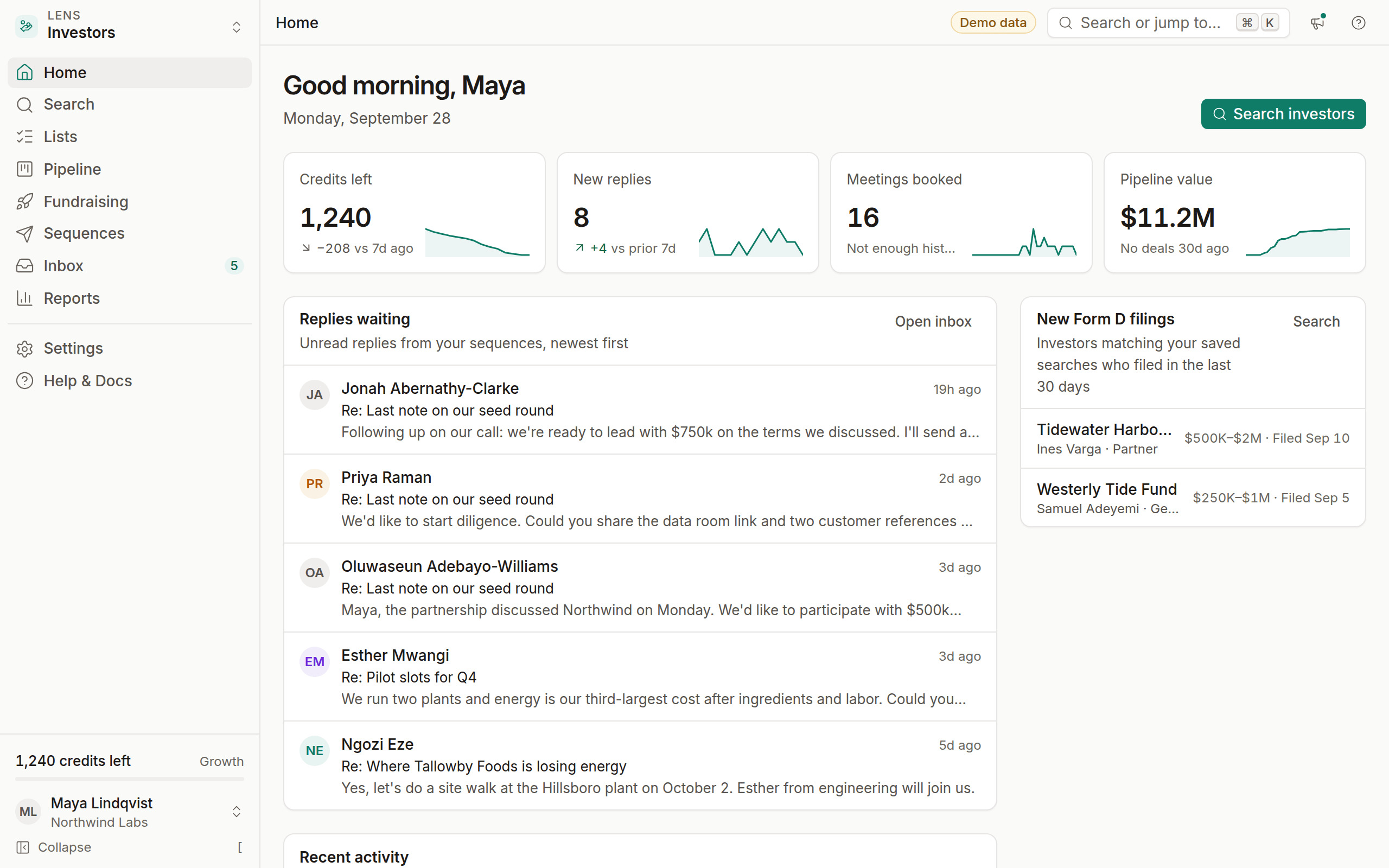
Who OmniLead is for
OmniLead is built around three kinds of work:
- Founders raising capital search investors by stage, check size and sector, build an opportunity profile and send a fundraising sequence.
- Agencies and B2B sales teams find companies and decision-makers, verify them and run outreach at a pace that protects their sending domains.
- Researchers and university spin-outs find open grants, funders, collaborators and expert survey respondents.
You don't have to pick one forever. Each kind of work is a lens, and you can switch lenses at any time on plans that include more than one.
The four lenses
Your CRM, inbox and contacts are shared across lenses. A lead you save from the Investors lens sits in the same pipeline as a customer you found in the Leads lens, tagged with the lens it came from. Read Choosing your lens for help picking where to start.
How it works
OmniLead follows the same four steps for every lens: Find → Verify → Reach → Close.
Find
Search with filters that fit the lens: stage and sector for investors, industry and title for leads, topic and institution for researchers, agency and deadline for grants. Results come from public sources, and contact details stay masked until you reveal them.
Verify
When you click Reveal · 1 credit, OmniLead shows the email and phone with a verification status (Valid, Risky, Catch-all, Invalid or Unknown) and a source link for each value.
Reach
Add leads to a sequence of emails and waits, sent from your own connected mailbox. Replies stop the sequence automatically, and bounces go straight to your suppression list.
Close
Track every conversation in a pipeline with notes, tasks, tags and custom fields. Replies land in one unified inbox next to the lead's history.
Every contact has a receipt
Click the provenance icon next to any value to see its source, for example Source: sec.gov · found Sep 12, 2026. OmniLead stores the source URL, the provider and the date for every field it shows you. If a value can't be traced to a public source, OmniLead doesn't show it.
This matters in three situations:
- Before you send. You can check that an address was published by the person or their organization, not guessed.
- When someone asks where you got their data. Under GDPR and similar laws you need to answer that question. The answer is one click away.
- When data goes stale. The found date tells you how fresh a value is, so you know when to re-verify.
Read Provenance explained for the full detail.
What OmniLead will never do
Some things are off the table on every plan:
- No LinkedIn scraping, and no scraping of any site whose terms forbid it. The crawler respects
robots.txtand identifies itself honestly. - No invented contacts. OmniLead never uses a language model to guess an email address, a person or an investor. Optional AI drafting only helps with email copy.
- No special-category data. OmniLead doesn't collect health, religion, ethnicity or political data, and you can't target people by demographic traits.
- No sending without the basics. A sequence can't launch without an unsubscribe link and your postal address in the footer.
If a provider needs an API key that your workspace hasn't added, OmniLead shows Connect provider instead of results. It never fills the gap with sample data. Demo records in the demo workspace are labelled as demo data.
Compliance is part of the product
Cold outreach is legal in many places when it's done properly, and risky when it isn't. OmniLead builds the safeguards in: one-click unsubscribe headers, a shared suppression list, per-country sending rules, a public opt-out portal and a Legitimate Interest Assessment template. You still decide how you run outreach, but the defaults keep you on the right side of CAN-SPAM, GDPR, CASL and CCPA.