Build your opportunity profile
Set your workspace to Raising or Investing, describe your round or thesis, and choose who can see it.
The fundraising portal connects founders who are raising with investors who use OmniLead. Founders describe their round in an opportunity profile. Investors describe what they back in an investment thesis. OmniLead scores every pairing and lets either side request an introduction.
Your profile also powers the match scores you see when you search the Investors lens, so it's worth filling in even if you only plan to email investors you find through SEC filings.
Choose Raising or Investing
Each workspace is in one of two modes. You picked one during onboarding if you chose the Investors lens. You can change it at any time.
- Raising: you're a founder looking for investors. You build an opportunity profile, see investor matches and request intros.
- Investing: you're an angel, a fund or a syndicate. You save a thesis, browse published opportunities that fit it and respond to intro requests.
Open the fundraising portal
Click Fundraising in the sidebar.
Check the mode
The mode shows at the top of the page. To change it, click Switch to Investing or Switch to Raising.
Confirm
Click Switch mode. Your profile or thesis is kept, so you can switch back without losing work.
Build an opportunity profile (Raising)
Start your profile
In Fundraising, open the Opportunity profile tab and click Edit profile.
Describe the company
Fill in Company name, Website and Country. Add a one-line Headline, for example "Freight audit software for mid-size UK retailers".
Write your pitch
Use Pitch for three to five sentences: the problem, your product, who pays and why now. Add Traction separately: revenue, growth, customers or pilots, with dates.
Set the round
Choose your Stage (Pre-seed, Seed, Series A, Series B, Series C or Growth), enter the Raise amount and pick the Currency.
Pick sectors
Add up to five Sectors. Put your main sector first: it counts for more in match scores.
Link your deck
Paste a Deck link, such as a DocSend, Google Drive or Notion link. Set its sharing so investors can open it without requesting access, or use a link that tracks views.
Choose visibility and save
Choose a Visibility (see below) and click Save profile.
Choose who can see it
Whatever you choose, your email and your teammates' contact details are never shown on the profile. Investors see the company, pitch, round and deck link. Contact details are shared only when you accept an intro, or when an investor accepts yours. See Request and accept intros.
You can make a profile private again at any time. It disappears from investors' lists immediately; intro requests already sent stay in place.
Save an investment thesis (Investing)
Investors describe what they back so OmniLead can rank opportunities for them.
Open your thesis
In Fundraising, open the Investment thesis tab and click Edit thesis.
Describe your focus
Enter a Name (your fund or your own name) and a short Thesis in plain words.
Set the criteria
Choose the Stages you invest at, your Sectors (or Generalist), your Geographies (countries, US states, regions such as EU or DACH, or Global) and your Check size range.
Publish if you want founders to find you
Turn on Visible to founders to appear in founders' match lists and receive intro requests. Leave it off to browse privately.
Save
Click Save thesis.
Published opportunities that fit your thesis appear under Opportunities, highest match score first.
Use your profile in investor search
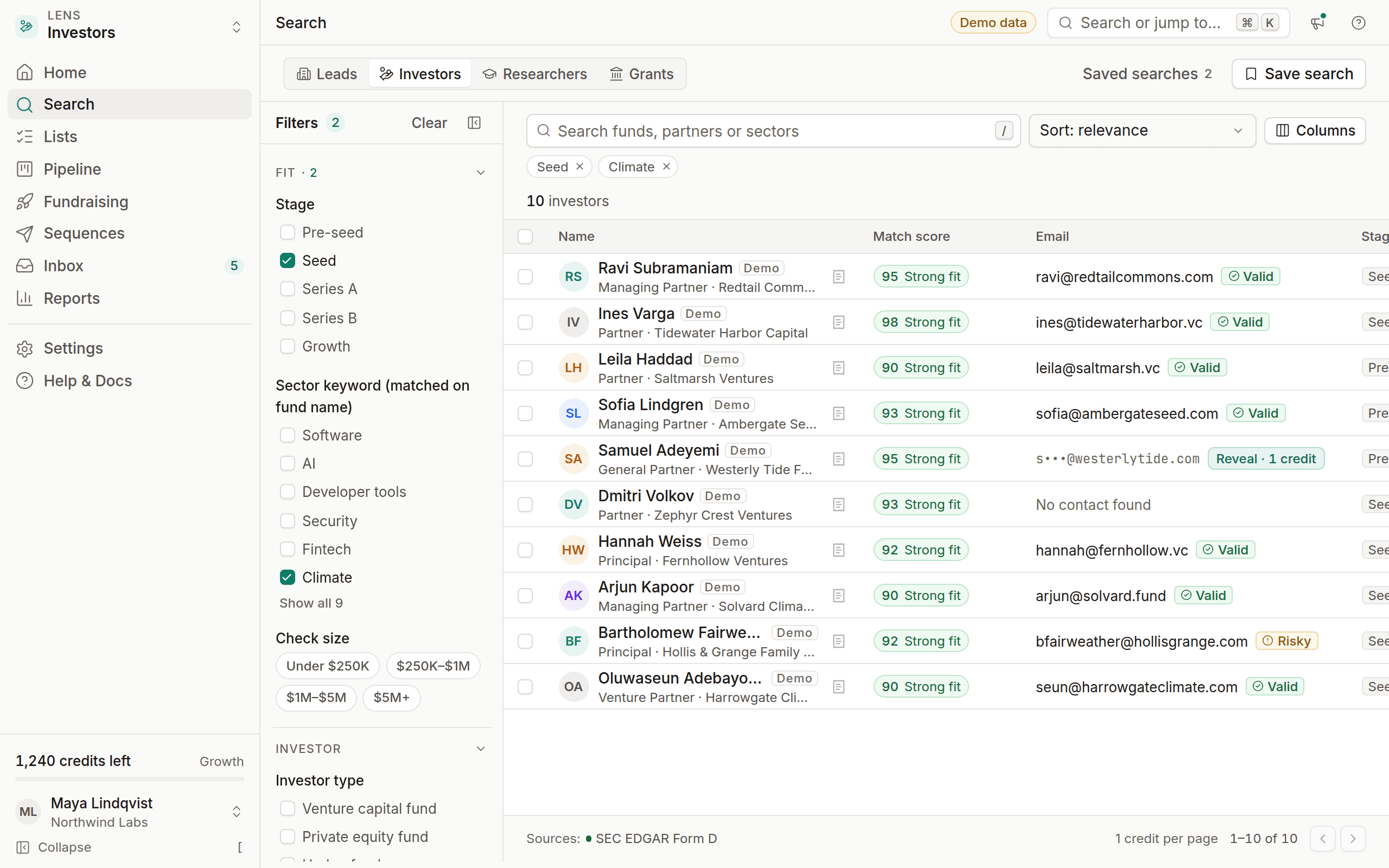
When your workspace is in Raising mode and your profile has a stage and sector, every result in the Investors lens shows a match score. Sort by Match score to see the best-fitting funds first, and click a score to see the breakdown. Investors in search come from SEC Form D filings and fund websites, so most of them aren't OmniLead users: you contact them with a sequence rather than an intro request.
Can one workspace raise and invest at the same time?
No. A workspace has one mode. If you're a founder who also angel-invests, create a second workspace for investing.
Does OmniLead share my deck?
Only as the link you provide, and only with the audience you choose. Set the link's own permissions to control who can open it.
Is the fundraising portal on Starter?
Starter includes the Investors lens. Opportunity profiles, match scores, published opportunities and intro requests are on Growth and Agency.